

Microsoft PlatformMicrosoft Dynamics 365 – Business Central

Microsoft Dynamics 365 Business Central ERP for Mid-Market Business

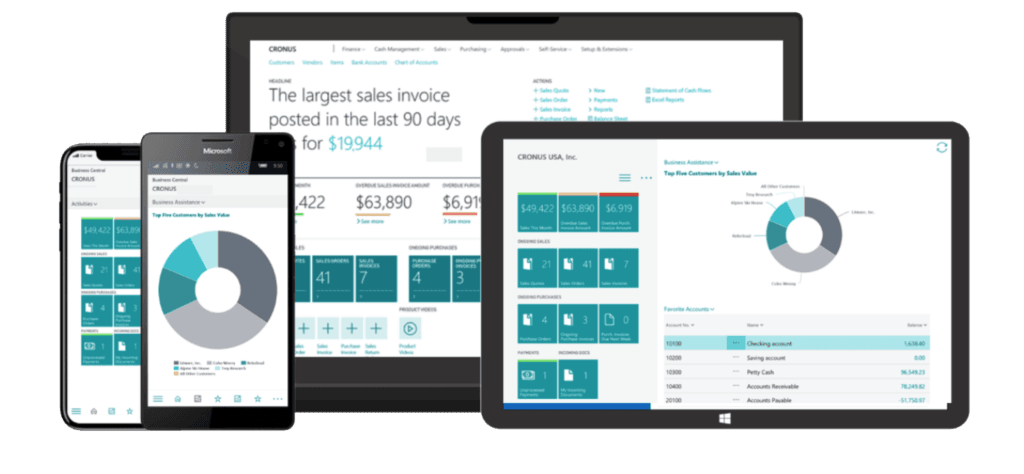
Dynamics 365 Business Central connects your people and processes with a single, unified solution, so data can be quickly and easily shared with key people throughout your company.

Move from disconnected systems to seamless collaboration and streamlined workflows. 

With Microsoft Business Central, you can transform your business into a modern, agile, and data-driven organisation. Empower your team, drive growth, and stay ahead of the competition.

Connect your people and processes like never before.

What can you do with Microsoft Dynamics 365 Business Central?

Work Smarter & Faster

Respond to inquiries faster.

Stay connected and simplify work by installing the Business Central app in Microsoft Teams to share business data within your Teams chats.

Connect your data with Microsoft 365.

Link your business data with productivity tools such as Microsoft Outlook and Excel to improve customer and employee experiences, like quote-to-cash workflow.

Automate workflows and processes.

Optimise performance using easy-to-create workflows, audit trails, enterprise-level security, and AI.

Handle, store, and transmit data securely.

Data is encrypted at-rest by using Transparent Data Encryption (TDE) and backup encryption. Business Central Online uses Azure Active Directory (Azure AD) as the authentication method.

Drive continuous process optimisation.

Improve outcomes and productivity with real-time system suggestions, based on historical data, to guide employees through workflows.

Get insights within the flow of business.

Access business intelligence when and where you need it, with real-time dashboards and KPIs for each user role.

Streamline Financial Management

Take control of financial data.

Better manage your cash flow, bank reconciliations, fixed assets, budgeting, and project costing while shortening cycle times with the late payment–prediction extension.

Accelerate financial closing and reporting.

Reduce month- and year-end closing times with connected general ledger, accounts receivable, payables, and fixed assets data. Streamline approval workflows using Power Automate.

Monitor financial performance.

Use built-in reports, Excel, or Microsoft Power BI and unlimited data dimensions to get real-time cash flow, identify financial patterns, analyze trends, and improve business planning.

Make more profitable financial decisions.

Connect reports, charts, and Power BI data from across accounting, sales, purchasing, and inventory teams to get accurate insights and make financial decisions with confidence.

Watch the Microsoft Copilot for Finance video below:

Boost Sales & Improve Service

Accelerate the sales process from quote to cash.

Act quickly on sales-related inquiries, manage service requests, and process payments – all from within Outlook.

Improve cash management.

Increase your cash flow by rightsizing inventory and maximizing the lifespan and governance of asset capitalization.

Prioritise Sales leads based on revenue potential

Keep track of customer interactions and get guidance on the best upsell, cross-sell, and renewal opportunities throughout your sales cycle.

Create recurring sales and purchase lines.

Set up standard sales or purchase lines that you can quickly insert on documents, for example, for recurring replenishment orders.

Optimise your Supply Chain

Improve supplier engagement.

Build better relationships with suppliers and convert the best offers to orders. Ensure compliance with internal and external policies with process governance and approvals.

Predict stock replenishment.

Replenish inventory based on actuals, demand, and availability using built-in intelligence, sales forecasts, and expected stock-outs to automatically create purchase orders.

Get a holistic view of your inventory.

Use different costing methods for inventory items, and easily move items between locations to control the quantity on hand using cycling counting.

Maintain optimal inventory.

Automatically calculating stock levels, lead times, and reorder points. When requested items are out of stock, automatically suggest replacements.

We Support our Clients on
their Business Transformation Journeys

Read a Case Study: 

Microsoft Dynamics 365 Business Central Frequently Asked Questions:

Can Dynamics 365 Business Central integrate with Salesforce, payroll, banking, reporting tools, or industry platforms?

Yes. Business Central integrates primarily via web services and APIs, with REST APIs recommended. Integrations commonly include CRM systems, payroll, banking, reporting tools and industry platforms.


What is the standard integration approach for Business Central?

Most integrations are implemented using Business Central web services, including REST APIs, SOAP and OData. REST APIs are the recommended approach, with agreed data flows defined during discovery.


Does Business Central integrate with Microsoft 365?

Yes. Business Central integrates natively with Microsoft 365 applications including Outlook, Teams, Excel and SharePoint, allowing users to work within familiar tools while accessing ERP data.


What does Business Central provide out of the box?

Business Central provides core ERP functionality out of the box, including:

  • Financial management
  • Sales
  • Purchasing
  • Inventory
  • Intercompany processing
  • Multi‑company and multi‑currency support.

When is extension or bespoke development required in Business Central?

Extensions or bespoke work are typically required where industry‑specific processes, advanced approval workflows, specialist reporting, or complex integrations go beyond standard Business Central capability.


How clean does data need to be before migrating to Business Central — and who is responsible?

Data must be trusted, reconcilable and fit for the target Business Central structure. Customers are typically responsible for data cleansing, with migration scope, templates and responsibilities agreed during discovery.

What is Microsoft Dynamics 365 Business Central?

Microsoft Dynamics 365 Business Central is a comprehensive cloud ERP solution designed for small and medium-sized businesses. It unifies financials, sales, service, manufacturing, logistics, supply chain, project management, and analytics in a single platform — giving your team a real-time view of the entire business.

What business functions does Business Central cover?

Business Central covers financial management, accounts receivable and payable, bank reconciliation, fixed assets, inventory, order management, manufacturing, supply chain, warehousing, project costing, and reporting — all in one connected system, eliminating the need for multiple disconnected tools across your organisation.

How does Business Central integrate with Microsoft 365?

Business Central integrates natively with Microsoft 365, connecting directly to Outlook, Excel, and Teams. You can manage quotes, invoices, and customer records from your Outlook inbox, analyse data in Excel without exporting, and share live business data inside Teams conversations with a single click.

Is Business Central secure and compliant?

Yes. Business Central Online uses Azure Active Directory for authentication and Transparent Data Encryption (TDE) for data at rest and backups. It operates on Microsoft's enterprise-grade Azure infrastructure, which meets a broad range of international compliance frameworks, helping organisations meet regulatory and security requirements confidently.

How does AI work in Business Central?

Business Central includes built-in AI capabilities that surface real-time suggestions based on historical data. Features include late payment prediction, cash flow forecasting, inventory optimisation recommendations, and Microsoft Copilot integration — letting users generate summaries, automate routine tasks, and get answers using natural language directly in the product.

How does TEKenable implement Business Central?

TEKenable delivers Business Central implementations end-to-end — from solution design and configuration through development, testing, and post-go-live support. Using an agile methodology and deep Microsoft expertise, TEKenable tailors the platform to your industry and processes, ensuring fast time-to-value without unnecessary customisation or risk.

Trusted for over 20 years

We deliver according to our values. Resilience, Heartfelt Service, Always Striving and Insatiable Curiosity.

Awards and Certifications

Reasons you can trust us.

Get in Touch with TEKenable

Search Our Website

Search for relevant content by typing in the search box below

Ready to get started?

Leave your details, choose your package and we’ll get back to you.

Get in Touch with TEKenable